


-

 Orders & Payments
-
Placing Orders
Placing OrdersHow do I check the balance on my Gift Card or eVoucher?
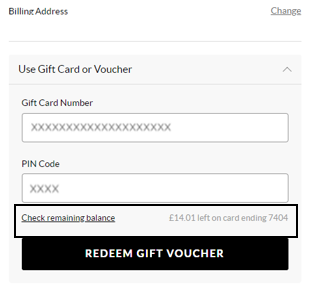
To view your balance on a Gift card or eVoucher you will need to add your items to the basket first and then once you've selected your delivery option you will be taken to the payment section. You will be presented with all the payment options available for your order. Select ‘Use Gift Card or eVoucher’ and enter your eVoucher/credit note code and pin number and then select ‘Check remaining balance’, you will then be able to see your balance.
Fanden Sie diesen Artikel hilfreich? Yes No
Feedback sendenVielen Dank für Ihr Feedback.
Wenn Sie uns mitteilen möchten, wie wir diesen Inhalt verbessern können, können Sie dem Autor des Artikels unten ein spezifisches Feedback geben.
Bitte beachten Sie: Diese Rückmeldung verbindet Sie NICHT mit dem Kundendienstteam. Wenn Sie sich mit uns in Verbindung setzen möchten, drücken Sie bitte unten auf „Abbrechen“ und dann auf „Kontakt“ und folgen Sie den Schritten.
-
Placing Orders